Thursday, 18 November 2010

v1.0.9 is coming...


The next build is on its way, and I'm pretty excited about it. The features I'm working on are:

Combat
Done: 
+Lions move broadly toward the player (extremely simple motion planning for now)
+Lions will "attack" player when beside him (this currently just means spamming the message box with a fake attack notice)
+Lions and Deer are no longer passable. They will block each other and the player.
To Do (as part of this build):
+Implement Status screen for player
+Implement HP and maybe some other basic stats
+Allow player to attack lions, causing time to pass
+Add a toggle for time, between continuous and rogue-like

Mountains
Done:
+Mountains now spawn
+Mountains can be dug to create awesome lairs!
To Do:
+Add better mountain graphics, e.g. outside wall visible, with inside dark (Toady One hopefully won't sue)
+Add hidden caves which only appear when dug into/near
+Think about how I'm going to stop player interacting with objects when there's no line of sight (I can pick up lions through a wall at the moment)

HUD/Menus
Done:
+Merged Nearby Objects and Current Square lists into one
+Tidied the general code which will make creating the Status menu easier
To Do:
+Decide what I'm going to do with the extra space generated from merging the lists
+Knock together a new HUD background in Paint
+Make the list ordering work better. First should be the top object on the square the player is next to and facing. Next, any monsters near enough for player to attack. Next, other objects on the current square. Lastly, other objects further away the player can interact with. This might get changed, but at the moment it's sorting them into a horrible order, and this sounds like a better way to go.

Hopefully I'll have time for all this at the weekend, stay tuned...

Tuesday, 9 November 2010

Start Screen, Map Builder, Flowers!

I really feel like the game is starting to progress now, and there's lots of new screens today.


First up: New start screen. As you can see, the menu item backgrounds are supposed to be little islands, as is the game name. I knocked this together using Game Maker's room editor. It's only a first draft, and I'm wondering if one day in the future I might find the time to have it randomly generate the start screen islands that are dotted around. I could even get some animals moving around on them or whatever.


Next, the map builder! It's got a long long way to go but I'm pretty happy with the general gist of how this works. Generate New Map builds a map using the current settings (listed below). Customise settings lets you edit those settings. Default/Random settings work as you would expect. Generate Random Map ignores the current settings and builds a map at random. Later, I intend for this feature not to show which settings have been used, so it's a mystery map, except for the preview. I'd also like options from the start menu which let you play a map with default settings or random settings, but without previewing, so exploring will be more fun.

The poor island generation algorithm is all too obvious when viewing the full map, but there's new code on the way for that. I don't want the preview to ultimately show all the creatures etc on the map, I may restrict it to only the island shapes, or perhaps some basic terrain such as trees and rocks. Lots of work to do here.


Finally, I've added flowers, and a little selection box. The flowers don't have any use yet but can be picked up. They add a bit of colour to the world, but at the moment the single sprite for them looks a bit repetitive, I might knock up a couple of other flower arrangements. The selection box, seen here to the left of the player, shows which object you are intending to interact with. I found while scrolling the list of nearby objects, it wasn't clear which you were selecting, so now it shows you on the map.

Next job: prioritising the objects on the list. I want to make dangerous monsters (i.e. lions) appear at the top, and then the rest should appear in some order based on your direction. At the moment it builds it using a double for loop, which means the top left object always appears at the top, but I'd like it to sort them more sensibly (e.g. near squares first).

Monday, 1 November 2010

Menus are in business!


Menus are just about done, at long, long last. There are a few tweaks need making, and plenty of code that can be optimised and shuffled, but I'm finally happy with both the overall structure and functionality . Let's just hope when I implement something new I don't realise any more massive oversights. Urgh.

Anyway, let's summarise what I've put in. Where to begin!

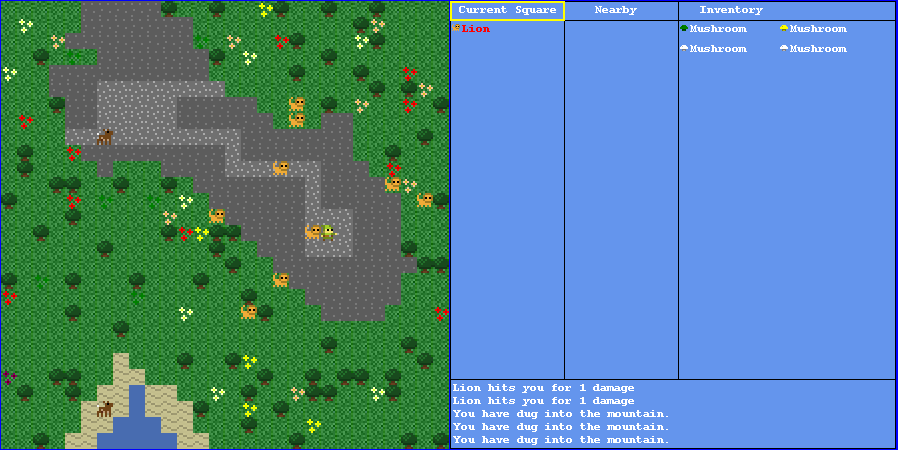
At risk of incurring the wrath of 800x600ers, the screen has been extended to 898x450. The idea was I wanted to keep the map at full size, while displaying all the sort of info you'd normally have to go onto a pause screen to view. Hopefully this will make for faster gameplay than the standard JRPG format, while keeping lots of tasty statistics and menus in the mix.

The first box shows the items the player is stood on, as before. 
The next box is for objects near to the player. Different objects have to be closer than others before they appear here. Mushrooms, for example, can only be interacted with when stood on. Trees (which can no longer be walked over) can be interacted with when adjacent. The idea is that you'll be able to talk to NPCs or fight monsters without having to be physically on their square.
The third box is the inventory, fairly self-evident.
At the bottom is a message box, which doesn't have much interesting being passed to it yet, but eventually will be used for things like "monster hits player for X damage" and so forth.

The player can now toggle between moving on the map, and using the menus. If you press on one of the objects, a sub-menu pops up with options. At the moment the options allow you to get info displayed in the message box, and you can pick up and drop items, which appear in the pop-up box as relevant. You might notice the lion in the screenshot can be picked up - that was just for fun (I gathered up all the lions on the map and then released them to watch them scatter).

There'll be other menu/HUD elements coming such as skills, spells, stats, etc. I'm still thinking on how to fit them all on the screen, as it's kind of cluttered already.

As you can see, I also added lions in, with colour coding to show them as dangerous (the deer now show as a pale green). Lions were very quick to add, and reminded me how fun and easy adding new content is. However I'm trying to resist stuffing the game full of cool new stuff for now, because the more content I add, the more work it is to change things, which is why it's being kept to a minimum at the moment. I am getting bored of the same limited maps now though, so I might work on something a bit more fun next.

Saturday, 30 October 2010

v1.0.5

I am still alive, but I'm having trouble getting the new build out. I keep having issues with the menus, and every time I think I have the solution and get the functionality back to where it was, I realise new problems have cropped up, which mean a new design and overhaul of huge chunks of code AGAIN. This is a causing me some frustration, as menus aren't the most exciting game element to put in, but I'm going to keep hammering away at it until I'm happy. In the meantime, here's a screenshot of the new game layout so far, which now runs in a 900x450 window:

Monday, 4 October 2010

Menus

Terrastrom v1.0.4 is well on its way, and with it comes prototype menus. This is proving particularly difficult to implement in a generic way, but it's coming along. I have created a Menu class, which hopefully will eventually deal with everything navigation.

I started working on this when I realised I will need pop-up menus for basically every interaction the game will ever do, so it made sense to get this done before continuing with the inventory. Hopefully soon we will begin to see several options when selecting a map object (e.g. talk, attack, pick up, info, etc), and similar when choosing a bag object (drop, eat...).

Because it works with delegates, a menu item can do essentially anything I can think of. This includes creating submenus, which I've just got working. When a new submenu is created, the focus swaps to it without removing the old menu, and the constructor automatically passes a reference to the parent menu, so it can deal with "Back" without having to store any info of how we got to where we are at in the menu.

It's not much to look at, but this was one of the cleverest pieces of code I've written so far so I'm pretty proud. It will feature fairly ubiquitously in the control scheme going forward. It's customisable so the menu panel images, spacing, text position and so on can all be unique to each menu, and it even has support for an optional sprite to go with the text (not shown here).

Monday, 27 September 2010

Terrastrom v1.0.3_2

Sorry Notch, I've brazenly stolen your version numbering system. (Release.Major.Minor_Revision)

This is more of an improvement to the last release, so no screenshot or new minor version number today.

I've now altered the code so that the player himself doesn't appear on the object list. This took a bit of faffing, and I ended up writing functions which retrieve the player's index from the list he's in, and another which returns the index of an object pretending the player isn't there. 

The player is usually at the end of the list, as the most recent to enter the square, but when a deer moves on top of you the deer becomes the last item, so no quick fudge was possible.

I also had to make sure that when the square contains only the player nothing funky happens, which I dealt with using a List.Count if statement, so the black arrow now doesn't appear at all when there are no objects to point at.


The code probably needs tidying, but weekends are the time to cleanse.

Saturday, 25 September 2010

Silverlight still on hold... Terrastrom v1.0.3

I had another go at Silverlight this weekend. I managed to make some headway with it, following a tutorial which taught me to draw some bmps to the screen. I'm basically in a situation where I have the tools to translate now.

However... I'm having major trouble working out how to distribute my Silverlight application. I've had some advice on the forums, but no luck so far. I just can't get the app to display on this blog. I will continue in XNA for now, and keep chipping away at Silverlight when I have time.

This weekend I started creating the basics of an inventory system. Each object is now assigned a boolean variable "CanBePickedUp", and those that have it set to true can be grabbed.

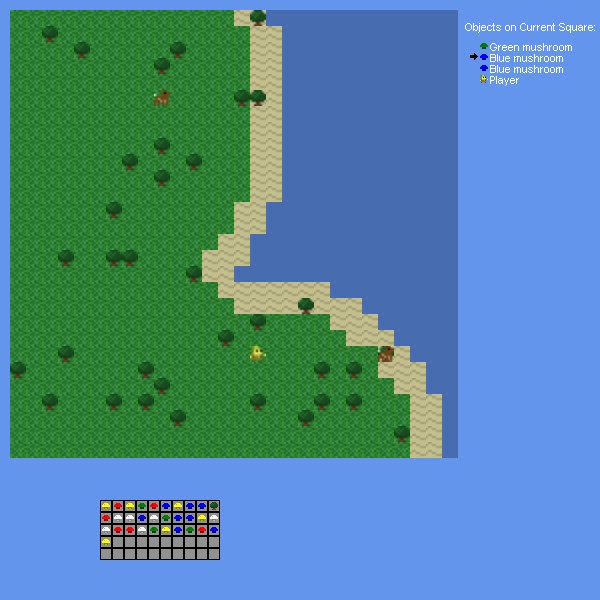
Now when the game is paused, a little arrow appears next to the list of objects, which can be scrolled using up and down, and objects can be picked up using Enter. At the moment the only items that can be picked up are mushrooms. Originally everything could be picked up, including deer, which was kind of fun (though they were hard to catch), and looked rather silly in the inventory. There's no way to drop or use anything in the bag yet, but it will fill up, and not accept new items when full. Each item takes up one square. I can set the bag to any size I choose, which for the moment is 10x5.

It's all very functionality-focused at the moment, and consequently looks dreadful, but here's a screenshot of the game when paused with a bag half-full of mushrooms (if you look closely there's also a tree in there, but I've switched them off now).


I also performed a major overhall of some of the code structure, completely changing how the sprites get stored and drawn. I realised it was focussed on drawing things on the map, and of course once the mushrooms get picked up they are no longer on the map. The sprites were basically storing information that should have been with the objects such as the map the object is placed on and the (x,y) position.

The Sprite class is basically trimmed down a lot, and I now have an intermediate Object class, which MapObject inherits from. The Map class stores all the objects on it in a big array of lists, and the Player class stores a bag as an Inventory class, which is essentially an array of objects with some functions (IsFull, GetNextEmptySquare, DrawAt). Each object has an associated sprite. When an item gets picked up it simply deletes itself from the relevant list on the map, and adds itself into the player's bag array in the first available slot. When drawing the map, there's a rectangle defining which area is currently being drawn, and a for loop goes through each object with "Drawn" set as true in each list in that rectangle, and draws the corresponding sprites. The bag's draw function is very simple, and just draws a slot at each point, and if there is an object in that slot, the object on top.

Next up ought to be dropping items from the bag, which should be fairly easy based on what I've done already. However I really want to think about the controls a bit more, as it's fairly Dwarf Fortress style so far, and while I don't want to require the mouse, I want the controls to be more intuitive. Not that DF isn't awesome, with or without impossible control scheme.